Instagram Photo Download
Download high-res Instagram photos instantly. Just paste the link and save!
How it moves
Three steps, one file
Paste the link
Copy the share link from the app and drop it into the box above.
Processing
We verify the link and get your file ready.
You save it
Tap the download button to save the file to your device.
- ✓Full carousels download as a complete set
- ✓Original resolution, no compression added
- ✓No watermark or overlay added to images
- ✓JPG output that opens anywhere
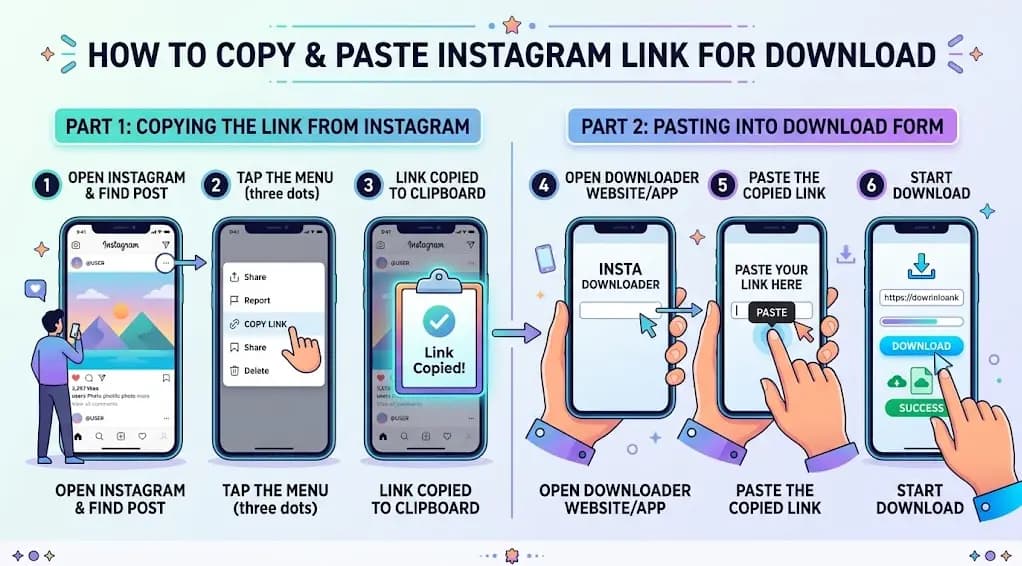
Instagram Photo Download: Save Pictures in Full Quality with Fastdlhub
Right-clicking an Instagram photo usually gets you a tiny, compressed thumbnail, not the actual image. Fastdlhub pulls the full-size photo instead, so what you save is what the poster actually uploaded.
How to Download an Instagram Photo
1. Open the post with the photo you want.
2. Tap the three dots and select "Copy Link."
3. Go to Fastdlhub.com and paste the link into the box.
4. Click the download icon and wait a moment while it loads.
5. Press "Download" and the photo saves to your device.
Works for single photos and carousel posts with multiple images.
Why People Download Instagram Photos
Some people want a moodboard reference. Some are saving a friend's photo before it disappears from their feed. Some just want their own old posts backed up somewhere that isn't tied to an app. Instagram compresses images pretty aggressively for feed display, so even your own photos look worse there than the original file you uploaded.
What You Get
Full resolution, not the compressed version Instagram serves in the feed.
No watermark added to the image.
JPG format, so it opens anywhere without extra software.
Works on iPhone, Android, and desktop through the browser, no app to install.
Carousel Posts
If the post has multiple photos, Fastdlhub lets you grab them individually rather than forcing you to download the whole set. Paste the link once and pick the image you actually want.
Things Worth Knowing
Photos can only be downloaded from public accounts. Private accounts need a follow and approval first. And the usual rule applies: the photo belongs to whoever posted it, so saving it for personal use is fine, but reposting it as your own isn't.
Copy the link, paste it in, and the photo's yours.
Questions
Before you paste a link
Can I download a whole carousel at once?
Yes — paste the post link and every photo in the carousel is pulled together.
Will the image quality be reduced?
No — you get the same resolution Instagram stores, without added compression.
What file format do the photos come in?
Photos are saved as standard JPG files, viewable on any device without extra software.
Do I need to log in to download photos?
No — just paste the public post link. No login or app install is required.
Can I download photos from a private account?
No. Only posts from public accounts can be fetched, the same content anyone could already view.
Will the downloaded photo have a watermark?
No — you get the original image exactly as posted, with no watermark added.
Is there a limit on how many photos I can download?
No — there's no cap on the number of photos or posts you can download.
How do I get the photo link to paste here?
Open the post in the Instagram app, tap the share icon, then "Copy Link," and paste it into the box above.
Does this work on mobile devices?
Yes — it works in any mobile browser on iOS or Android, no app installation needed.
Is this tool free to use?
Yes — downloading photos with this tool is completely free, with no hidden charges.
Why did my download fail?
This usually happens if the link is from a private account, the post was deleted, or the URL was copied incorrectly. Double-check the link and try again.
Is it safe to use this tool?
Yes — you only need to paste a public link. No account credentials or personal information are ever requested.